Stop Duplicate Leads from Scanned Business Cards
The same card gets scanned twice more often than you'd think. Here's how to design duplicate rules that keep your Salesforce org clean.
Duplicates creep into every CRM, and business cards are a common source. A rep scans a card at an event, then scans it again at the follow-up meeting. Two colleagues meet the same visitor at the same booth. Without a check, each scan becomes a new record.
Why duplicates hurt
- Two reps may contact the same person with different messages.
- Activity history is split across records, so nobody sees the full picture.
- Reports overstate pipeline and event performance.
- Cleaning up later takes far longer than preventing it.
Designing a good matching rule
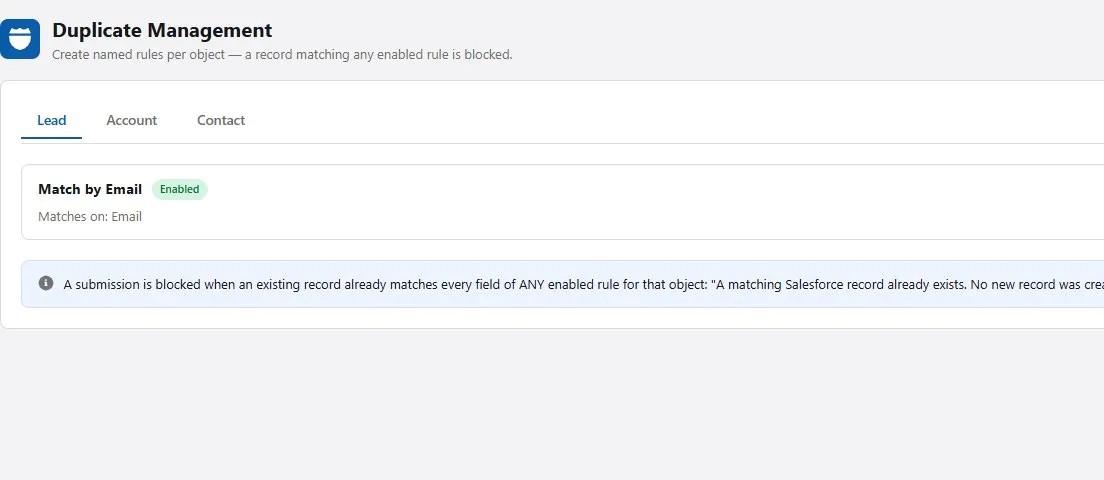
PeriScan’s Duplicate Management lets you define rules per object (Lead, Account, Contact). Each rule lists the fields that must match and how they match. A few patterns work well:
- Email first. An exact email match is the strongest signal that two records are the same person.
- Phone as a fallback. When a card has no email, an exact phone match is a good second check.
- Name + company. Useful for catching people who changed email domains, but broader — pair it with a warning rather than a hard block.
Rules are evaluated in priority order, so put your most reliable match at the top.
Choose what happens on a match
For each object you can decide how PeriScan responds when it finds a likely duplicate:
- Do not create — the safest choice for most orgs.
- Warn the user — let them review the existing record before deciding.
- Allow creation — for cases where you knowingly want separate records.
Test before you roll out
Scan a card for a contact who already exists in your org and confirm the rule triggers as expected. Then try a near-match — same company, different email — to check your fallback behaviour.
Clean data is a habit, not a project. See how PeriScan’s admin tools work.